
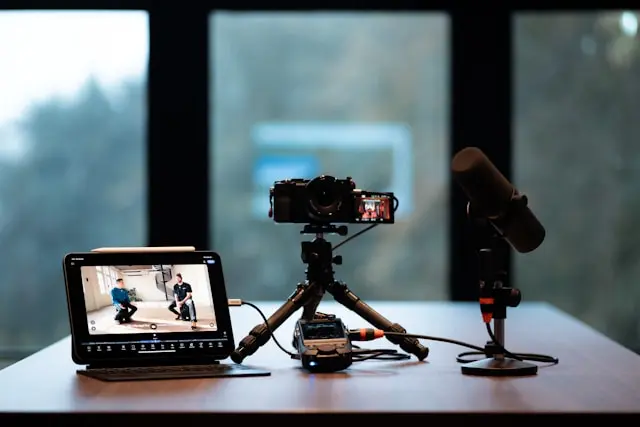
The Ultimate Guide to Setting Up Your Streaming Setup
Introduction
Streaming has become more popular than ever, whether you’re sharing gameplay, hosting live chats, teaching skills, or just hanging out with an online audience. While watching streams is easy, setting one up can feel intimidating—especially if you’re new to streaming or not very technical.
The good news is that you don’t need a studio-level setup to get started. With the right hardware, simple software choices, and a few smart adjustments, you can create a clean, professional-looking stream that runs smoothly and keeps viewers engaged.
In this guide, we’ll walk through everything you need to build a solid streaming setup from the ground up. We’ll cover essential hardware, streaming software and platforms, layout and presentation tips, and how to optimize your stream for the best performance. Whether you’re just starting or looking to improve your current setup, this guide will help you feel confident going live.
Essential Hardware for Your Streaming Setup
Your hardware forms the foundation of your stream. While you don’t need top-of-the-line gear, having reliable equipment makes a big difference in quality and consistency.
Computer or Console
Your system needs to be powerful enough to handle streaming alongside gameplay or other tasks.
- A modern multi-core CPU helps with encoding
- A dedicated graphics card improves performance
- At least 16GB of RAM is recommended for smoother multitasking
Console streamers can stream directly from systems like PlayStation or Xbox, though a capture card offers more control and customization.
Microphone
Audio quality is one of the most important parts of a stream. Viewers are more likely to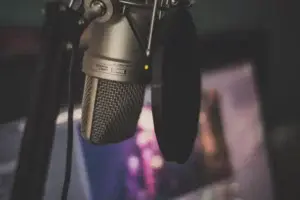 leave a stream with bad audio than one with average video.
- USB microphones are beginner-friendly
- XLR microphones offer higher quality but require an audio interface
- Use a boom arm and pop filter for cleaner sound
Clear, consistent audio goes a long way toward keeping viewers engaged.
Camera (Optional but Recommended)
While not required, a webcam helps viewers connect with you.
- 1080p webcams offer a good balance of quality and performance
- Good lighting matters more than camera price
- Position the camera at eye level for a natural look
Lighting
Proper lighting improves video quality dramatically.
- Ring lights are easy and affordable
- Softbox lights offer more control
- Avoid strong light sources behind you
Even simple lighting upgrades can make your stream look more professional.
Streaming Software and Platforms
Once your hardware is ready, you’ll need software to manage and broadcast your stream.
Streaming Software
Streaming software captures your screen, camera, and audio, then sends everything to your chosen platform.
- OBS Studio is free and widely used
- Streamlabs offers built-in overlays and alerts
- Both options are beginner-friendly and customizable
Start with default settings and adjust gradually as you gain experience.
Streaming Platforms
Choosing the right platform depends on your goals.
- Twitch is popular for gaming and live interaction
- YouTube is great for discoverability and archived content
- Facebook Gaming works well for community-focused streams
You don’t have to commit to just one platform forever—many streamers experiment before settling in.
Alerts and Chat Tools
Interactive features make streams more engaging.
- Follower and donation alerts
- Chat overlays
- Moderation tools
These features help you interact with viewers and create a welcoming environment.
Creating a Professional and Engaging Stream Layout
Your stream layout is what viewers see on screen, and a clean design makes a big difference.
Organizing Your Screen
Avoid clutter by keeping your layout simple.
- Place your webcam where it doesn’t block gameplay
- Use readable fonts for overlays
- Keep alerts subtle and consistent
Less is often more when it comes to stream design.
Overlays and Branding
Overlays help define your stream’s style.
- Use consistent colors and themes
- Add a simple logo or username
- Avoid distracting animations
Your layout should enhance the content, not overpower it.
Background and Environment
If you’re on camera, your background matters.
- Clean up visible areas
- Use LED lights or subtle décor
- Virtual backgrounds can work, but physical ones often look better
A tidy and intentional background makes your stream feel more polished.
Optimizing Your Stream for Quality and Performance
Even with good hardware, optimization is key to a smooth stream.
Internet Connection
A stable internet connection is essential.
- Use a wired Ethernet connection when possible
- Upload speeds matter more than download speeds
- Close unnecessary apps using bandwidth
Streaming on Wi-Fi can work, but wired connections are more reliable.
Video and Audio Settings
Balance quality and performance.
- Start with 1080p resolution or 720p
- Adjust bitrate based on your internet speed
- Test audio levels before going live
Always do test recordings or private streams before broadcasting publicly.
Monitoring Performance
Keep an eye on system usage during streams.
- Watch CPU and GPU load
- Monitor dropped frames
- Adjust settings if performance dips
Smooth performance keeps viewers watching longer.
Practice and Consistency
Streaming improves with time.
- Practice talking while gaming
- Stream on a regular schedule
- Review past streams to spot improvements
Consistency builds both skill and audience.
Conclusion
Setting up a streaming setup doesn’t have to be complicated or expensive. By focusing on the right hardware, choosing beginner-friendly software, creating a clean layout, and optimizing performance, you can build a stream that looks professional and runs smoothly.
The most important thing to remember is that streaming is a learning process. Start simple, make improvements over time, and don’t be afraid to experiment. Your personality and consistency matter just as much as your gear.
Are you thinking about starting a stream, or do you already have one up and running? Leave a comment below and share your setup, questions, or tips—your experience could help someone else take the leap into streaming!