
Setting Up a Home Server: Everything You Need to Know
Introduction
For many people, the idea of setting up a home server sounds complicated or overly technical. You might picture large racks of equipment, complicated networking tools, or enterprise-level hardware. In reality, a home server can be much simpler—and far more useful—than most people realize.
A home server is essentially a computer dedicated to handling specific tasks on your home network. It can store files, stream media, host game servers, back up devices, run smart home software, or even act as your own private cloud storage system.
As more people rely on digital storage, streaming services, and connected devices, home servers have become increasingly popular among typical users—not just tech enthusiasts. The good news is that you don’t need expensive hardware or advanced IT skills to get started.
In this guide, we’ll walk through why you might want a home server, how to choose the right hardware and software, the basic setup process, and how to maintain and expand your server over time.
Why Set Up a Home Server?
A home server offers a wide range of benefits depending on how you plan to use it. Some people use servers for convenience, while others want more control over their files and services.
Centralized File Storage
One of the biggest advantages is centralized storage. Instead of keeping files scattered across multiple devices, a home server allows you to store everything in one place.
This can include:
- Photos and videos
- Documents
- Music collections
- Game files
- Device backups
You can then access these files from computers, smartphones, or tablets connected to your network.
Media Streaming
Many users build home servers to create their own personal media centers. Software like media servers can stream movies, TV shows, or music to devices around the house.
This gives you more control over your content without relying entirely on subscription services.
Automatic Backups
Home servers are excellent for backups. Instead of manually copying files to external drives, you can automate backups for:
- PCs and laptops
- Smartphones
- Important documents
- Family photos
This adds an extra layer of protection against data loss.
Learning and Experimentation
Setting up a home server is also a great learning experience. It introduces users to:
- Networking basics
- File sharing
- Operating systems
- Remote access
- Virtualization and containers
Even a simple server setup can teach valuable technical skills.
Smart Home and Gaming Uses
Home servers can also power:
- Smart home automation systems
- Private game servers
- Security camera storage
- Website hosting
- Personal cloud storage
The possibilities grow as your experience increases.
Choosing the Right Hardware and Software
One of the most common misconceptions about home servers is that they require expensive hardware. In many cases, older or spare computers work perfectly well for basic server tasks.
Hardware Options
Your hardware needs depend on what you want your server to do.
For simple file storage or backups, you may only need:
- An older desktop PC
- A mini PC
- A low-power server device
- Multiple hard drives for storage
If you plan to stream media, host games, or run multiple applications, stronger hardware may be beneficial.
Important Hardware Considerations
Here are a few key things to think about:
Storage Capacity
Storage is often the most important part of a home server. Consider how much data you plan to store now and in the future.
Power Efficiency
Servers often run 24/7, so energy-efficient hardware can help reduce electricity costs.
Network Connection
A wired Ethernet connection is strongly recommended for better speed and reliability.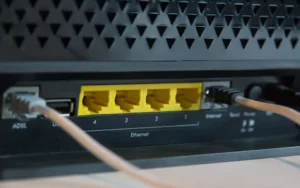
Cooling and Noise
Servers generate heat, especially under heavy workloads. Good airflow and cooling are important, particularly if the server will run constantly.
Choosing an Operating System
There are several operating systems commonly used for home servers:
- Linux distributions
- Windows Server or standard Windows
- NAS-focused systems
- Lightweight server operating systems
Beginners often prefer simpler interfaces, while more advanced users may choose Linux for flexibility and customization.
Popular Server Software
Depending on your goals, you may install software for:
- File sharing
- Media streaming
- Backups
- Virtual machines
- Smart home management
Many modern server tools include web-based dashboards that make management easier for beginners.
Step-by-Step Setup Process
Setting up a home server may seem intimidating, but breaking it into smaller steps makes the process much easier.
Step 1: Decide What the Server Will Do
Before buying or configuring anything, identify your primary goals.
Ask yourself:
- Will it mainly store files?
- Do you want media streaming?
- Will it host game servers?
- Do you need remote access?
Knowing the purpose helps determine hardware and software requirements.
Step 2: Prepare the Hardware
Once you’ve chosen your hardware:
- Clean the system if it’s older
- Install storage drives
- Check cooling and fans
- Connect the server to your router using Ethernet
Reliable hardware is important for long-term stability.
Step 3: Install the Operating System
Next, install your chosen server operating system.
Basic setup usually includes:
- Creating administrator accounts
- Configuring storage drives
- Connecting to the network
- Installing updates
Take your time during this stage and follow setup instructions carefully.
Step 4: Configure Storage and Sharing
Set up folders and permissions for file access.
You may want separate folders for:
- Backups
- Media files
- Shared family documents
- Personal data
Organizing files early helps keep things manageable later.
Step 5: Install Server Applications
Once the system is running, install any applications you need, such as: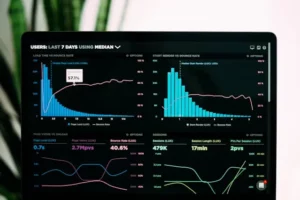
- Media server software
- Backup tools
- Remote access utilities
- Monitoring software
Test each feature gradually instead of setting up everything at once.
Step 6: Test Access Across Devices
Finally, make sure other devices on your network can connect successfully.
Test:
- File transfers
- Media streaming
- Backup functionality
- Remote connections
This helps identify configuration problems early.
Maintaining and Expanding Your Home Server
A home server isn’t something you simply set up and forget forever. Regular maintenance helps keep it reliable and secure.
Keep Software Updated
Updates often include:
- Security patches
- Bug fixes
- Performance improvements
Ignoring updates can leave your server vulnerable to security risks.
Monitor Storage Health
Hard drives can fail over time, so it’s important to monitor drive health regularly.
Watch for:
- Strange noises
- Slow performance
- Drive errors
- Overheating
Replacing failing drives early can prevent major data loss.
Create Backup Plans
Even servers need backups. Important files should still be copied to external drives or cloud storage for extra protection.
Redundancy is important because no single system is completely immune to failure.
Expand Gradually
One of the great things about home servers is that they can grow over time.
You might eventually add:
- More storage drives
- Faster networking equipment
- Additional server applications
- Virtual machines or containers
Start simple and expand as your needs evolve.
Pay Attention to Security
If you enable remote access, strong security practices become essential.
Use:
- Strong passwords
- Two-factor authentication when possible
- Firewall protections
- Secure remote access methods
A poorly secured server can become a target for attacks.
Conclusion
Setting up a home server may sound like a big project at first, but it can be surprisingly approachable for typical users. Whether you want centralized file storage, media streaming, backups, or a place to learn new technical skills, a home server offers flexibility and long-term value.
The key is to start with clear goals and keep things simple in the beginning. You don’t need enterprise hardware or advanced networking knowledge to create a useful and reliable server setup.
As you gain experience, your server can grow alongside your needs. Many users find that setting up a home server not only improves convenience but also helps them better understand how computers, networking, and storage systems work behind the scenes.
Most importantly, don’t be afraid to experiment and learn as you go. Every server setup is a little different, and part of the fun is discovering what works best for your home and your workflow.
Have you ever considered building a home server, or do you already have one running? What would you use it for? Share your thoughts, questions, or setup ideas in the comments below—your experience might help inspire someone else to start their own home server journey!