
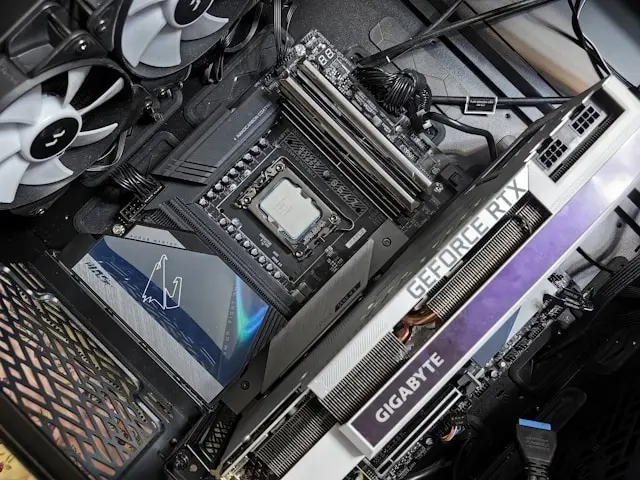
Tips For Building The Best Gaming PC For Your Budget
Introduction
Building a gaming PC is one of the most rewarding projects a gamer can take on. Not only do you get a system tailored to your specific needs, but you also gain a better understanding of how your computer works and how to upgrade it in the future. The challenge for most people isn’t deciding whether to build a gaming PC—it’s figuring out how to get the best performance without overspending.
With countless processors, graphics cards, motherboards, and accessories available, it’s easy to get overwhelmed. Marketing can make every component seem essential, and many first-time builders worry about making costly mistakes. Fortunately, building a great gaming PC doesn’t require buying the most expensive parts on the market. In fact, some of the best gaming systems are carefully balanced builds that focus on performance where it matters most.
Whether you’re building your first gaming PC or upgrading from an older system, understanding how to budget effectively can help you maximize your investment. In this guide, we’ll cover how to set a realistic budget, research components, determine where to spend and save, and avoid common mistakes that can impact your gaming experience.
Set a Realistic Budget and Prioritize Components
The first step in building a gaming PC is deciding how much you’re comfortable spending. It’s important to establish a budget before shopping because it’s very easy to get carried away when comparing components.
Determine Your Gaming Goals
Before selecting parts, ask yourself a few questions:
- What games do you want to play?
- What resolution will you use?
- Do you want high frame rates for competitive gaming?
- Will you use the PC for streaming or content creation?
Someone playing esports titles at 1080p will have different hardware needs than someone aiming for 4K gaming with maximum settings.
Prioritize the Graphics Card
For most gaming builds, the graphics card (GPU) should receive the largest portion of your budget. The GPU has the biggest impact on gaming performance and visual quality.
A common mistake is overspending on other components while choosing a weaker graphics card. In many cases, allocating more of your budget toward the GPU will provide better gaming results than purchasing a premium processor or expensive RGB accessories.
Don’t Ignore the Processor
While the graphics card is critical, the processor (CPU) still plays an important role. A balanced combination of CPU and GPU helps prevent bottlenecks that can reduce performance.
Most gamers don’t need the most expensive processor available. Mid-range CPUs often deliver excellent gaming performance while leaving more room in the budget for a stronger graphics card.
Include Essential Extras
When creating your budget, remember to account for:
- Operating system costs
- Monitor purchases
- Keyboard and mouse
- Headset or speakers
- Additional storage
- Cooling solutions
Many first-time builders forget these items and end up exceeding their planned budget.
Research and Compare Before You Buy
One of the best ways to maximize your budget is by researching components thoroughly before making purchases.
Read Reviews and Benchmarks
Performance numbers can vary significantly between components. Reading reviews and watching benchmark comparisons can help you understand how parts perform in real-world gaming scenarios.
Pay attention to:
- Average frame rates
- Power consumption
- Cooling performance
- Reliability
- Value for money
Benchmarks often reveal that some components offer significantly better performance per dollar than others.
Compare Multiple Retailers
Prices frequently vary between retailers. Taking a little extra time to compare prices can save a surprising amount of money.
Watch for:
- Seasonal sales
- Bundle deals
- Mail-in rebates
- Open-box discounts
Patience can often lead to substantial savings.
Check Compatibility
Compatibility issues are among the most common problems faced by new builders.
Before purchasing components, verify:
- CPU and motherboard compatibility
- RAM support
- Power supply wattage
- Graphics card clearance
- Case dimensions
Using online compatibility tools can simplify this process and help prevent costly mistakes.
Plan for Future Upgrades
A little planning now can make future upgrades easier.
For example:
- Choose a motherboard with expansion options
- Select a power supply with extra capacity
- Leave room for additional storage
Building with future growth in mind can extend the life of your gaming PC.
Know Where to Save and Where to Invest
Not every component affects gaming performance equally. Understanding where to invest your money can help you build a stronger system overall.
Invest in the GPU
As mentioned earlier, the graphics card is often the most important gaming component. If your budget is limited, prioritizing the GPU generally produces the best results.
A slightly less expensive CPU paired with a stronger graphics card often outperforms the opposite approach in gaming workloads.
Choose a Reliable Power Supply
The power supply is one area where cutting corners can be risky.
A quality power supply offers:
- Better reliability
- Improved efficiency
- Stable power delivery
- Enhanced system protection
Cheap power supplies can cause instability and potentially damage other components.
Save on RGB and Cosmetics
RGB lighting and premium aesthetics can look great, but they don’t improve gaming performance.
If you’re working within a tight budget, consider prioritizing performance components first and adding cosmetic upgrades later.
Avoid Overspending on the Motherboard
Many gaming PCs don’t require premium motherboards with advanced features.
A mid-range motherboard often provides:
- Sufficient connectivity
- Stable performance
- Expansion options
- Future upgrade support
Pay for features you’ll actually use rather than features that simply sound impressive.
Consider Storage Needs Carefully
Solid-state drives (SSDs) are highly recommended for gaming because they reduce loading times and improve system responsiveness.
However, many gamers can save money by choosing:
- A moderate-sized SSD for Windows and games
- A secondary drive for additional storage
This combination often provides excellent value.
Build Smart and Avoid Common Mistakes
Once you’ve selected your components, it’s time to assemble your system. Careful planning and attention to detail can prevent many common issues.
Take Your Time
One of the biggest mistakes first-time builders make is rushing through the process.
Work slowly and:
- Read manuals carefully
- Double-check connections
- Follow installation instructions
- Organize screws and components
Patience can prevent expensive errors.
Manage Cables Properly
Good cable management improves:
- Airflow
- Appearance
- Maintenance accessibility
Using cable ties and routing cables carefully can make your build look cleaner and run cooler.
Verify Cooling and Airflow
Proper airflow is essential for maintaining stable temperatures.
Make sure:
- Intake and exhaust fans are positioned correctly
- Components have adequate clearance
- Dust filters are installed where applicable
Poor airflow can lead to overheating and reduced performance.
Update Drivers and BIOS
After assembling the system, update:
- Graphics drivers
- Motherboard drivers
- Chipset software
- BIOS firmware when appropriate
These updates often improve stability and performance.
Don’t Panic if It Doesn’t Boot
Many new builders experience issues during the first startup.
Common causes include:
- Loose power cables
- Improperly seated RAM
- Incorrect front-panel connections
- Monitor connection issues
Carefully reviewing each connection usually resolves the problem.
Benchmark and Monitor Temperatures
After setup, test your system to ensure everything is functioning correctly.
Monitor:
- CPU temperatures
- GPU temperatures
- Fan speeds
- Gaming performance
This helps identify potential issues before they become major problems.
Conclusion
Building the best gaming PC for your budget isn’t about buying the most expensive parts available. It’s about making smart decisions, prioritizing performance where it matters most, and creating a balanced system that meets your gaming goals.
By setting a realistic budget, researching components carefully, understanding where to invest your money, and avoiding common mistakes, you can build a gaming PC that delivers excellent performance without breaking the bank. The process may seem intimidating at first, but with patience and planning, even first-time builders can achieve great results.
Perhaps the best part of building your own gaming PC is the sense of accomplishment that comes from powering on a system you’ve assembled yourself. You’ll gain valuable knowledge, enjoy a customized gaming experience, and have a platform that’s easier to upgrade in the future.
Have you built your own gaming PC, or are you planning your first build? What tips, lessons, or favorite components would you recommend? Share your thoughts and experiences in the comments below—we’d love to hear from you!