

Top SSD Models For Gaming
If you’re still gaming on a traditional hard drive, you’re honestly missing out. One of the biggest and most noticeable upgrades you can make to a gaming PC is switching to an SSD (Solid State Drive). Faster load times, smoother gameplay, and quicker system boot-ups all come with it — and the good news is that SSDs are more affordable than ever.
In this guide, we’ll break things down in plain English. No jargon overload. By the end, you’ll know why SSDs matter for gaming, what features to look for, and which SSD models are worth your money.
Why an SSD Matters for Gaming Performance
An SSD doesn’t increase your FPS directly, but it dramatically improves how games feel.
Here’s what an SSD actually does for gamers:
- Faster game load times – open-world games load levels and textures much quicker
- Reduced stuttering – especially in games that stream data in real time
- Quicker system boot-ups – your PC starts in seconds, not minutes
- Faster game installs and updates
Compared to traditional HDDs, SSDs have no moving parts, which means faster read/write speeds and better reliability. Modern games like Cyberpunk 2077, Starfield, and Call of Duty are designed with SSDs in mind — some even list them as a recommended requirement.
If gaming is a priority for you, an SSD is no longer optional — it’s essential.
Key Features to Look for in a Gaming SSD
Before buying an SSD, it helps to know what actually matters. You don’t need the most expensive drive on the market — you just need the right one for your setup.
1. SSD Type (SATA vs NVMe)
- SATA SSDs
-
- Much faster than HDDs
- Affordable and widely compatible
- Great for budget or older systems
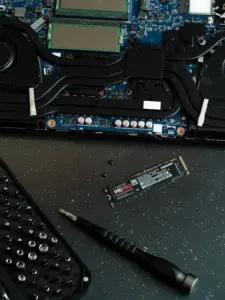
- NVMe SSDs
-
- Extremely fast (up to 7x faster than SATA)
- Ideal for modern gaming PCs
- Best for large open-world games and fast loading
If your motherboard supports NVMe, that’s usually the way to go.
2. Storage Capacity
Games are huge these days. A single AAA title can take 100GB or more.
Recommended sizes:
- 500GB – Minimum for casual gaming
- 1TB – Sweet spot for most gamers
- 2TB+ – Best for large game libraries
3. Read/Write Speeds
Look for:
- SATA SSDs: ~500–550 MB/s
- NVMe SSDs: 3,000–7,000 MB/s
Higher speeds = faster loading and smoother performance.
4. Reliability & Warranty
Gaming SSDs should come with:
- Good endurance ratings (TBW)
- At least a 3–5 year warranty
Top SSD Models Recommended for Gamers
Here are some reliable, popular SSDs that gamers consistently trust, covering different budgets and needs.
Samsung 970 EVO Plus (NVMe)
- Excellent performance and reliability
- Great for gaming and everyday use
- Strong balance of speed and price
Best for: Gamers who want dependable performance without going ultra-high-end
Samsung 990 PRO (NVMe Gen 4)
- Extremely fast read/write speeds
- Ideal for next-gen gaming and content creation
- Premium performance
Best for: High-end gaming rigs and enthusiasts
WD Black SN850X (NVMe)
- Designed specifically for gaming
- Excellent thermal performance
- Works great with DirectStorage
Best for: Gamers who want optimized performance for modern titles
Crucial P3 / P5 Plus (NVMe)
- Affordable NVMe options
- Solid performance for the price
- Great upgrade from SATA
Best for: Budget-conscious gamers
Samsung 870 EVO (SATA)
- One of the best SATA SSDs available
- Excellent reliability
- Easy upgrade for older systems
Best for: Older PCs or budget builds
WD Blue SA510 (SATA)
- Affordable and dependable
- Easy installation
- Good everyday gaming performance
Best for: Entry-level gaming setups
Choosing the Right SSD for Your Gaming Setup
Picking the “best” SSD really depends on your system and your goals.
Here’s a quick way to decide:
Go with NVMe if:
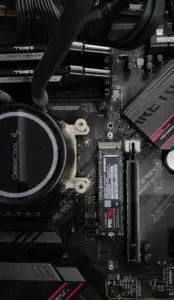
- Your motherboard supports it
- You play large, modern games
- You want the fastest load times possible
Go with SATA if:
- You’re upgrading an older PC
- You’re on a tight budget
- You still want a huge speed boost over HDD
Storage Tips for Gamers
- Use a smaller SSD for Windows and apps
- Use a larger SSD for games
- Keep at least 15–20% free space for best performance
If you’re building a new gaming PC, a 1TB NVMe SSD is usually the perfect starting point.
Final Thoughts
An SSD is one of the most impactful upgrades you can make for gaming — even more noticeable than a CPU upgrade in many cases. Faster loading, smoother gameplay, and a better overall experience make it well worth the investment.
Whether you’re on a budget or building a high-end gaming rig, there’s an SSD out there that fits your needs.
💬 Now I want to hear from you:
What SSD are you currently using for gaming? Have you noticed a big difference after upgrading from a hard drive? Drop your thoughts, questions, or recommendations in the comments — let’s help other gamers make the right choice!