
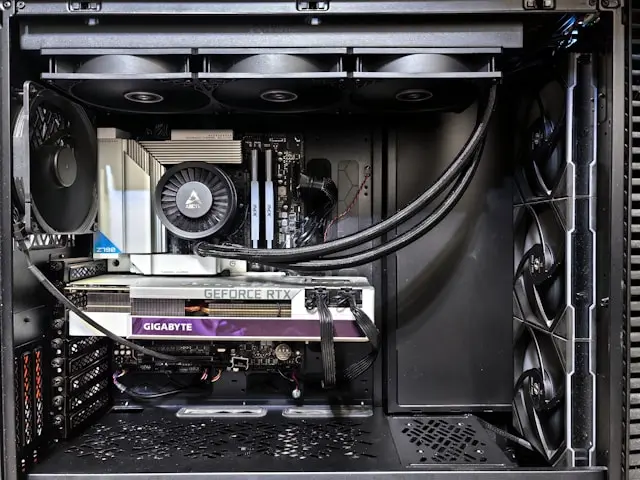
Best Practices for Cable Management in Your PC Build
Introduction
Cable management is one of those PC-building steps that’s easy to overlook—especially if you’re eager to power on your new system and see it come to life. But taking the time to manage your cables properly can make a huge difference in how your PC looks, performs, and even how long it lasts.
Good cable management isn’t just about aesthetics (though a clean build definitely feels good). Properly routed cables improve airflow, make troubleshooting easier, and help prevent accidental damage to components. The good news? You don’t need to be a professional builder or have fancy tools to do it well.
In this guide, we’ll walk through why cable management matters, what tools can help, practical strategies for keeping things tidy, and how to maintain your setup over time—all in plain, easy-to-follow language.
Understanding the Importance of Cable Management
At first glance, cables might seem harmless. After all, if everything is plugged in and working, does it really matter if wires are a little messy? The short answer: yes.
One of the biggest reasons cable management matters is airflow. Loose or tangled cables can block airflow inside your case, trapping heat around critical components like the CPU and graphics card. Over time, excess heat can lead to performance throttling or even shorten the lifespan of your hardware.
Cable management also improves ease of maintenance. If you ever need to upgrade a part, replace a fan, or troubleshoot a problem, neatly routed cables make the process far less frustrating. You won’t have to guess where a cable goes or accidentally unplug the wrong thing.
There’s also a safety factor. Poorly managed cables can get caught in fans, leading to noise, damage, or sudden shutdowns. In extreme cases, pinched or strained cables can wear out faster.
Finally, let’s not ignore the visual appeal. A clean PC interior looks professional and satisfying—especially if your case has a side window. Even if no one else sees it, you’ll know it’s done right.
Essential Tools and Materials for Effective Cable Management
You don’t need a toolbox full of expensive gadgets to manage your cables, but a few simple items can make the job much easier.
Zip ties are the most common cable management tool. They’re cheap, strong, and great for bundling cables together. Just be careful not to tighten them too much—you don’t want to damage the wires.
Velcro cable ties are another excellent option, especially for beginners. They’re reusable, adjustable, and more forgiving if you need to rearrange things later.
Cable sleeves or extensions help group cables together and give your build a cleaner look. Many builders use these to match a color theme, but they also help keep cables organized.
A pair of scissors or flush cutters is useful for trimming excess zip ties and keeping things neat.
Most modern PC cases also include helpful features like routing channels, tie-down points, and a PSU shroud. Take advantage of these—they’re designed specifically to make cable management easier.
Good lighting helps too. Being able to clearly see what you’re doing inside the case can save time and prevent mistakes.
Strategies for Tidy and Efficient Cable Routing
Before you start plugging everything in, it helps to have a plan. Think about where your cables will go and how they’ll be routed before securing them.
Start with the power supply cables. Route the main motherboard power cable and CPU power cable through the nearest grommets or cutouts. Try to keep them tight against the back of the case whenever possible.
Next, focus on data cables like SATA or front-panel connectors. These cables are usually thinner and easier to hide. Run them along the edges of the case or behind the motherboard tray.
When connecting front panel cables (power button, USB, audio), group them together and route them through a single path. These cables are often the messiest, so taking extra care here pays off.
Use bundling techniques to keep cables together. Instead of managing each wire individually, group related cables into a single bundle and secure them at multiple points.
Avoid crossing cables over open areas in the case. If a cable must cross, try to keep it flat and close to the case surface.
Leave a little slack in each cable. Tight cables can pull on connectors, especially when you move or transport the PC. A small amount of extra length helps prevent stress on ports.
Finally, step back and take a look before closing the case. If airflow looks clear and nothing is dangling near fans, you’re on the right track.
Maintaining and Updating Your Cable Management
Cable management doesn’t end once your PC is built. Over time, you may add new hardware, replace components, or upgrade your system—and each change can affect your cable layout.
Whenever you open your case, take a moment to check your cables. Make sure nothing has come loose and that no wires are drifting into fan paths.
If you add new components, resist the urge to just “plug and forget.” Take the extra few minutes to route and secure new cables properly. Your future self will thank you.
Dust buildup can also impact cable management during routine cleaning. During routine cleaning, gently move cables if needed to clean hard-to-reach areas, then return them to their original position.
If your case starts to feel crowded, consider upgrading to shorter cables or modular PSU cables that better fit your layout. This can dramatically reduce clutter.
Cable management is an evolving process, not a one-time task. Small adjustments over time help keep your system running smoothly and looking its best.
Conclusion
Cable management might not be the most exciting part of building a PC, but it’s one of the most rewarding. A well-organized system improves airflow, simplifies upgrades, reduces wear on components, and gives your build a clean, professional appearance.
You don’t need advanced skills or expensive tools—just a little patience and planning. By understanding why cable management matters, using the right tools, and applying smart routing strategies, you can dramatically improve your PC build.
Do you have any cable management tips, struggles, or success stories from your own builds? Drop a comment below and join the conversation—I’d love to hear how you tackle cable clutter in your PC!