
Common Mistakes to Avoid When Organizing Cables
Introduction
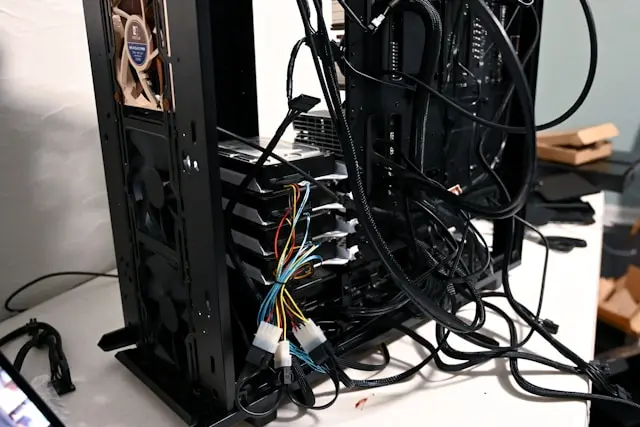
If you’ve ever looked behind your desk or PC setup and seen a tangled mess of cables, you’re definitely not alone. Cable clutter is one of the most common issues for computer users, whether you’re working with a simple home setup or a full custom-built PC. The good news? Cable management isn’t as complicated as it looks—and getting it right can make a big difference.
Organizing your cables doesn’t just make your setup look cleaner (though that’s a huge bonus). It can also improve airflow, make troubleshooting easier, and even extend the life of your components. But here’s the catch—many people jump into cable management without a plan and end up making mistakes that cause frustration later.
In this guide, we’re going to walk through some of the most common cable management mistakes and how to avoid them. Whether you’re tidying up your desk or organizing cables inside your PC case, these tips will help you do it right the first time.
Using the Wrong Cable Management Tools
One of the biggest mistakes people make is using whatever they have lying around instead of the right tools. While it might be tempting to grab some random twist ties or tape, this can lead to messy results—or worse, damage your cables.
Common Issues
Using the wrong tools can cause a few problems:
- Cables slipping out of place

- Difficulty making adjustments later
- Damage to cable insulation
- A cluttered or uneven appearance
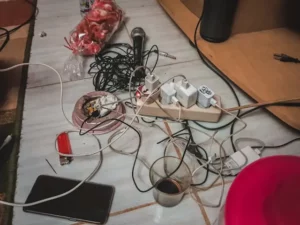
For example, standard zip ties can hold cables tightly, but they’re not always the best choice if you plan to make changes later. Once tightened, they usually need to be cut to remove, which can be inconvenient.
Better Options
Instead, consider using tools designed specifically for cable management:
- Velcro cable ties (reusable and adjustable)
- Cable sleeves (great for bundling multiple wires)
- Cable clips (help guide cables along surfaces)
- Cable management boxes (hide power strips and excess cables)
These tools not only make your setup look cleaner but also make it easier to maintain over time.
Quick Tip
Start small. You don’t need every tool available—just a few well-chosen items can make a big difference.
Poor Planning and Layout
Another common mistake is jumping straight into organizing cables without planning where everything should go. This often leads to cables being rerouted multiple times, which wastes time and creates unnecessary frustration.
Why Planning Matters
Without a plan, you may end up with:
- Cables crossing over each other
- Uneven cable lengths
- Limited airflow inside your PC
- Difficulty accessing ports and components
Planning helps you create a clean, efficient layout from the start.
How to Plan Your Setup
Before you start organizing, take a few minutes to think about your layout:
- Where are your power outlets?
- Where will your devices be positioned?
- Which cables need to be easily accessible?
- Which cables can be hidden completely?
For PC builds, consider routing cables behind the motherboard tray or through dedicated cable channels in your case.
Visualizing the Layout
It can help to loosely position your cables before securing anything. This allows you to test different routes and find the cleanest setup without committing too early.
Overstuffing or Over-Tightening Cables
It’s easy to assume that tighter is better when it comes to cable management—but that’s not always the case. Overstuffing bundles or tightening cables too much can actually cause problems.
The Risks of Tight Cables
Over-tightening can:
- Damage cable insulation
- Put stress on connectors
- Reduce cable lifespan
- Make future adjustments difficult
Cables need a little flexibility to function properly, especially power cables and data cables that may need to move slightly.
Avoid Overstuffing
Trying to force too many cables into one sleeve or bundle can make your setup look bulky and messy. It can also trap heat, which isn’t ideal for your components.
Instead:
- Group cables logically (power, data, peripherals)
- Use multiple smaller bundles instead of one large one
- Leave a bit of slack for flexibility
Finding the Right Balance
Your goal should be neat and secure—not overly tight. If a cable looks strained or bent sharply, it’s a sign you need to loosen things up.
Neglecting Labeling and Identification
This is one of the most overlooked parts of cable management—and it often comes back to cause problems later.
At first, everything might seem obvious. But once you have multiple devices connected, it becomes much harder to tell which cable belongs to what.
Why Labeling Matters
Without labels, you may run into issues like:
- Unplugging the wrong device
- Spending extra time troubleshooting
- Struggling to upgrade or replace components
Labeling makes everything easier, especially when you need to make changes down the line.
Simple Labeling Solutions
You don’t need anything fancy to label your cables:
- Use small adhesive labels

- Write directly on cable tags
- Use color-coded ties or clips

Even a simple system can save you a lot of time and frustration.
When to Label
The best time to label cables is during the initial setup. It’s much easier than trying to figure things out later when everything is already bundled together.
Conclusion
Cable management might seem like a small detail, but it has a big impact on your overall setup. A clean, organized system not only looks better but also improves airflow, makes maintenance easier, and reduces the chances of accidental damage.
By avoiding common mistakes—like using the wrong tools, skipping the planning stage, over-tightening cables, or forgetting to label them—you can create a setup that’s both functional and easy to manage.
The key is to take your time and think ahead. You don’t need a perfect, professional-level setup right away. Even small improvements can make a noticeable difference.
If you’ve ever struggled with messy cables, now is a great time to tackle the problem and create a cleaner, more efficient workspace.
Have you tried organizing your cables before? Do you have any tips or lessons learned from your own setup? Drop a comment below and share your experience—your advice might help someone else get their cables under control!