
Tips for Cable Management in Small PCs
Introduction
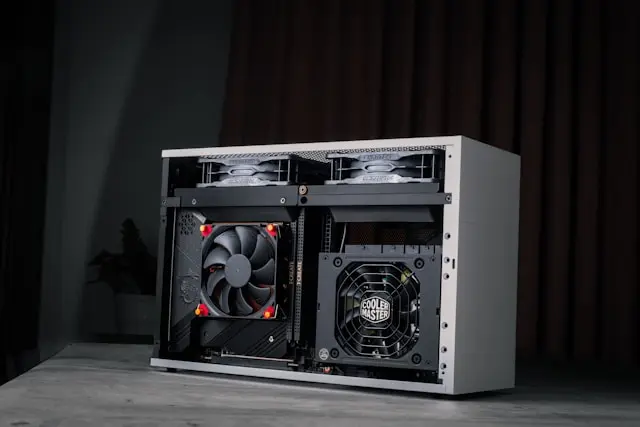
Building or upgrading a small PC can be incredibly rewarding—but let’s be honest, cable management in a compact case can feel like trying to solve a puzzle with too many pieces. Unlike larger builds where you have plenty of room to work, small form factor (SFF) PCs require a bit more planning, patience, and strategy.
The challenge isn’t just making things look neat. In a small PC, proper cable management plays a big role in airflow, cooling performance, and even long-term reliability. Poorly managed cables can block airflow, create heat buildup, and make future upgrades a hassle.
The good news? With the right approach, you can keep your cables tidy—even in tight spaces. In this guide, we’ll walk through practical tips to help you plan, organize, and maintain your cable setup in a small PC without the stress.
Planning Ahead for Efficient Cable Routing
When it comes to small PC builds, planning is everything. Trying to organize cables after everything is installed can quickly turn into a frustrating experience.
Start Before You Build
Before you even begin assembling your PC, take a few minutes to plan your layout:
- Identify where your power supply (PSU) cables will run

- Check your case’s cable routing paths
- Look for tie-down points or hidden channels
- Think about how components will fit together
Small PC cases often have limited space behind the motherboard tray—or none at all—so knowing your cable paths in advance can save you a lot of time.
Choose the Right Components
Some components make cable management easier than others. For example:
- Modular or semi-modular power supplies let you use only the cables you need
- Shorter cables are often better for compact builds
- Low-profile components can create more space for routing
If you’re still in the planning stage, choosing hardware designed for small builds can make a big difference.
Dry Fit Your Cables
Before securing anything, loosely place your cables where you think they should go. This “test run” helps you spot potential issues, like cables that are too long or areas where space is too tight.
A little planning upfront can save you from having to redo your work later.
Using the Right Cable Management Accessories
In a small PC, the right tools can make or break your cable management efforts. Because space is limited, you need accessories that are both effective and compact.
Must-Have Accessories
Here are a few essentials that work especially well in small builds:
- Velcro cable ties – Reusable and easy to adjust
- Short zip ties – Useful for tight, permanent bundles
- Cable combs – Help keep visible cables neat
- Cable sleeves – Bundle multiple cables into one clean line
These tools help you keep cables under control without taking up too much space.
Keep It Minimal
One mistake people often make is overusing accessories. In a small PC, adding too many clips or bulky sleeves can actually make things worse by taking up valuable space.
Stick to what you need:
- Use smaller bundles instead of large ones
- Avoid stacking too many cables together
- Keep accessories low-profile whenever possible
Route Smart, Not Just Tight
It’s tempting to pull cables as tight as possible to keep them out of the way, but this can put stress on connectors and make maintenance harder.
Instead:
- Leave a little slack in your cables
- Avoid sharp bends
- Make sure connectors aren’t under tension
The goal is a clean, functional layout—not just a tight one.
Optimizing Airflow and Organization
In small PCs, airflow is critical. Even a small obstruction can affect cooling performance, so cable management plays a direct role in keeping your system running efficiently.
Keep Air Paths Clear
Most cases are designed with specific airflow paths in mind—typically from front to back or bottom to top. Your cables should stay out of these paths as much as possible.
Try to:
- Route cables along the edges of the case

- Keep the center area as open as possible
- Avoid blocking fans or vents
Group Cables by Function
Organizing cables based on their purpose can help keep things tidy and easier to manage:
- Power cables together
- Data cables (like SATA) together
- Fan cables grouped separately
This not only improves organization but also makes troubleshooting easier later.
Use Hidden Spaces
Even in small cases, there are often small gaps or unused areas where cables can be tucked away. Look for:
- Space near the PSU
- Areas behind drive cages
- Corners of the case
Using these hidden spots can help reduce clutter in visible areas.
Watch for Heat Build-Up
Cables packed too tightly can trap heat, especially near components like the CPU or GPU. If you notice high temperatures, it might be worth revisiting your cable layout to improve airflow.
Troubleshooting and Maintenance Tips
Even with careful planning, cable management in small PCs isn’t always perfect on the first try. That’s completely normal.
Common Issues and Fixes
Problem: Side panel won’t close
- Solution: Re-route cables to reduce bulk or flatten bundles
Problem: High temperatures
- Solution: Clear airflow paths and reduce cable clutter near fans
Problem: Loose or messy cables over time
- Solution: Re-secure cables with fresh ties or adjust routing
Make Adjustments Gradually
Instead of trying to fix everything at once, make small adjustments and test your system in between. This helps you identify what changes actually improve your setup.
Keep Future Upgrades in Mind
One of the biggest challenges with small PCs is making upgrades later. If your cables are too tightly packed or difficult to access, even a simple upgrade can become a hassle.
To avoid this:
- Leave some slack in key cables
- Avoid blocking important components
- Keep commonly accessed cables easy to reach
Regular Maintenance
Cable management isn’t a one-and-done task. Over time, you may add new components, move your setup, or notice things shifting.
A quick check every few months can help you:
- Keep cables secure
- Maintain good airflow
- Prevent dust buildup
Conclusion
Cable management in small PCs might seem challenging at first, but with the right approach, it becomes much more manageable. By planning ahead, using the right tools, and focusing on airflow and organization, you can create a setup that looks clean and performs efficiently—even in tight spaces.
Remember, perfection isn’t the goal. A neat, functional setup that keeps your system cool and easy to maintain is what really matters.
Take your time, make small improvements, and don’t be afraid to adjust things as you go. Every small step brings you closer to a cleaner, more efficient build.
Have you built or upgraded a small PC recently? What cable management tricks worked best for you? Share your tips, questions, or experiences in the comments below—your insights could help someone else tackle their own compact build with confidence!